AirCyber: prepare your certification with IT-OneView
Looking to earn an AirCyber label or move up to the next level? IT-OneView supports you by handling many management and control measures: estate inventory, Windows patches, protection monitoring, account management and policy signatures. Your documents, evidence and action plan are brought together to prepare your assessment and track your progress.
A maturity framework for the aerospace and defense industry
AirCyber is the cybersecurity maturity framework led by BoostAeroSpace for the aerospace and defense industry. It assesses practices, structures a path of improvement and gives formal recognition to a maturity level: Bronze, Silver or Gold.
For companies in the industry, preparing for the label involves IT teams, security managers and business units alike. IT-OneView gives them a shared view of the estate, the protections and the actions to take, along with the evidence the assessment calls for.
See the official BoostAeroSpace presentation
Your evidence and actions in one place
The GRC module helps you organize your requirements, centralize evidence and track corrective actions. Your teams find policies, signed documents and pending actions in one place to prepare your AirCyber assessment.
Discover the Governance module
Measures managed day to day, evidence for your assessment
- Automate everyday measures. Up-to-date inventory, Windows patches, joiners and leavers, policy signatures: IT-OneView handles many of the tasks that support your AirCyber effort.
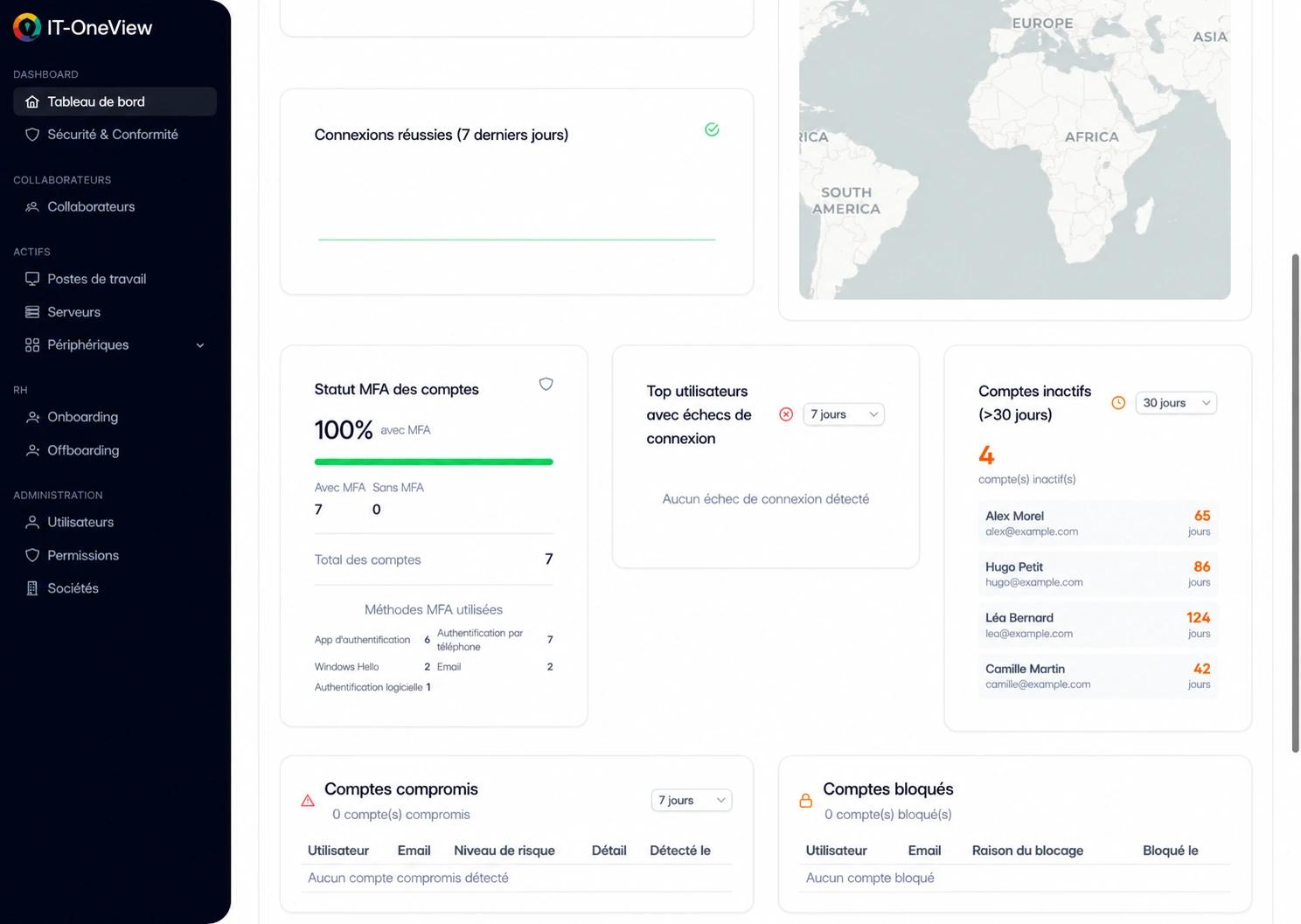
- Monitor the security of your estate. See the status of antivirus, encryption and MFA, along with the vulnerabilities in your software. You spot the devices and accounts that need attention.
- Gather evidence and drive actions. Your policies, signed documents, evidence and corrective actions are brought together in the platform. Your teams share a common base to prepare the assessment.
With IT-OneView, your estate data and your GRC tracking stay connected. You rely on up-to-date information to document your practices and focus your efforts on the actions that matter.
The measures IT-OneView handles
From inventory to incident management, see the tasks carried out in the platform and the evidence you can gather for your AirCyber effort.
An inventory that stays up to date
IT-OneView in practice. IT-OneView automatically inventories workstations, servers and their software through its agent. Installed versions and changes are tracked over time, so your knowledge of the estate stays current.
Evidence for the assessment. Asset inventory, software versions and change history.
Windows patches, scheduled and tracked
IT-OneView in practice. Define your Windows update policies, schedule deployments and track their results. IT-OneView also matches the software in your estate against known vulnerabilities to help you prioritize fixes.
Evidence for the assessment. Windows deployment results and the list of vulnerable software per asset.
A central view of endpoint protections
IT-OneView in practice. IT-OneView checks antivirus indicators, the Windows firewall status and BitLocker or FileVault encryption. You spot the gaps and know which devices to act on.
Evidence for the assessment. Protection status on the devices running the agent, with the gaps identified.
Joiners and leavers under control
IT-OneView in practice. Onboarding and offboarding workflows organize the tasks, the creation and deactivation of AD and Microsoft 365 accounts, and the signing of policies. The MFA status of Microsoft 365 accounts is visible in the platform.
Evidence for the assessment. History of completed steps, signed policies and MFA status of Microsoft 365 accounts.
Backup results under control
IT-OneView in practice. IT-OneView uses the reports from your backup tools to track runs, missed jobs and success rates. You can also schedule restore tests in your GRC action plan.
Evidence for the assessment. History of the results received and reports of the restore tests carried out by your teams.
Policies distributed, charters signed
IT-OneView in practice. Centralize your policies and charters, track their versions and distribute them with acknowledgment of receipt or electronic signature. Periodic reviews can be scheduled and their reports kept in the GRC module.
Evidence for the assessment. Versioned documents, acknowledgments of receipt, signatures and review reports.
Incidents logged, escalations organized
IT-OneView in practice. The incident register brings together events, evidence and the actions taken. Playbooks organize escalations and notifications to bring in the right people.
Evidence for the assessment. Incident records, supporting evidence and the history of actions and notifications.
A four-step approach
- Set your goal. Choose the AirCyber level you are aiming for and identify the companies, sites and systems in scope with your assessor.
- Gather the material. Bring together your estate data, policies and supporting documents to demonstrate the measures in place.
- Move the actions forward. Assign corrective actions to your teams, set deadlines and track their completion. Your estate data helps you check progress.
- Prepare the assessment. Find your answers, evidence and action plan in one place to prepare your discussions with your AirCyber assessor.
A shared foundation to prepare your certification
Estate information, security controls and documents are brought together in IT-OneView. Your teams can rely on this foundation to prepare your AirCyber assessment and find the evidence that demonstrates the measures in place.
As actions are completed, you track the gaps closed and the progress made. You prepare your discussions with the assessor from the data and documents you use every day.
Your teams and your providers in the same effort
Physical security measures, network segmentation, penetration tests and SOC services are also part of your security organization. The GRC module lets you document these measures and track the related actions, alongside those handled in IT-OneView.
You keep the big picture to prepare the assessment and work with your AirCyber contacts. The evidence from your teams and providers complements what is gathered in the platform.
Frequently asked questions
How does IT-OneView support AirCyber certification?
IT-OneView handles many of the management and control tasks the effort calls for: inventory, Windows patches, protection monitoring, account management, document signatures and incident tracking. The GRC module centralizes your documents, evidence and actions. The AirCyber assessor determines the level achieved based on the measures in place in your company.
Can we include evidence from our other tools?
Yes. You can centralize documents and track the actions related to your security measures. Firewall configurations, provider reports or test reports thus sit alongside the items tracked in IT-OneView.
Can we prepare for the Bronze, Silver and Gold levels?
IT-OneView helps you organize evidence and actions according to your certification goal. With your AirCyber assessor, you set the target level and the requirements that apply to your company, then evolve your action plan as you progress.
How do we track our progress toward the label?
The GRC module centralizes your evidence and the tracking of your actions. The action plan brings together owners, deadlines and the fixes to make. Estate indicators help you check the results of technical actions and prepare the next reviews.